The useful WooCommerce AI tools are not the ones that promise to “run the store.” They remove one stubborn queue: checking performance, repairing weak product data, preparing catalogue updates, or answering repetitive pre-sale questions.
I am wary of AI plugins that put a sparkle icon beside every field and call that a workflow. Writing a product description is easy. Writing 600 descriptions that preserve dimensions, materials, compatibility notes, warranty conditions, and a recognizable brand voice is operations work. The second job needs source data, review queues, permissions, and an undo path.
For this shortlist I looked for tools that live close to a real WooCommerce task, disclose what data leaves the store, and let a person review changes before they reach customers. My five picks are WooCommerce AI, IntelliDesc for WooCommerce, Sprintr, Extendons AI Chatbot and Assistant, and Kestrel AI Assistant.
Quick comparison
| Tool | Best use | Where it works | AI connection | Main concern |
|---|---|---|---|---|
| WooCommerce AI | Store questions, insights, draft-product and coupon changes | WordPress admin | WordPress.com-connected Woo service | Supported actions and data coverage are still bounded |
| IntelliDesc | Descriptions, specs, FAQs and product SEO | Product editor and catalogue tools | Gemini, Claude, OpenAI, Grok, OpenRouter or WordPress AI | Generated technical facts still require verification |
| Sprintr | Catalogue-wide copy, images, video, pricing and profit review | External connected workspace | Third-party platform subscription | More data and workflow live outside WordPress |
| Extendons AI Chatbot | Product discovery and first-line customer questions | Storefront widget and admin | Your OpenAI key | Bad retrieval settings can produce confident wrong answers |
| Kestrel AI | One-at-a-time copy, review replies and order notes | Existing WooCommerce edit screens | Your OpenAI key | Limited bulk workflow and older model choices |
WooCommerce AI: useful because it starts with store context
WooCommerce’s own AI assistant is the most sensible first test because it is designed around the admin screens a store team already uses. It can answer questions about the store, surface a weekly brief, work with supported unpublished product drafts and coupons, and present changes for review before applying them. The documentation also describes Intelligence features such as forecasts and customer segments, plus developer routes through MCP and the UCP REST API.
The experience I would test first is deliberately boring: ask for last week’s order count, the top-selling product, and low-stock items, then compare each answer with WooCommerce Analytics. That exposes date-range assumptions and missing records quickly. Only after read-only answers are dependable would I allow it to prepare a change.
The important word is supported. This is not a universal agent that understands every subscription, booking, bundle, or custom order-status extension. The assistant exposes a defined set of abilities, and some operations have preview or undo support while others may not. A store with substantial custom code should treat each action as an integration to test, not a general promise.
IntelliDesc: stronger when product attributes are the source of truth
IntelliDesc is more interesting than a generic paragraph generator because it works with short descriptions, long descriptions, specifications, FAQs, comparison blocks, and product SEO. It supports several AI providers rather than locking the store to one model. The free edition handles products individually; the paid edition adds bulk queues, real WooCommerce attributes, social captions, broader FAQ generation, duplicate-content reports, and SEO fields for Yoast and Rank Math.
The part I would use carefully is Smart Specs extraction. It can save hours for electronics, tools, or parts, but a model that recognizes a product name may still confuse a regional model number or silently fill a specification from a similar item. My workflow would start with approved attributes, supplier data, and existing notes; AI can organize and rewrite them, but it should not invent the source record.
Its privacy explanation is refreshingly specific: product content is sent only when generation is requested, while the duplicate-content scan runs locally. No customer or order data is needed for the writing task. That separation is a good pattern for any AI plugin handling a catalogue.
Sprintr: the pick when the problem is not one product page
Sprintr takes a broader approach. It imports the connected catalogue into a workspace where a team can inspect copy, SEO, pricing, recorded costs, margins, product images, video, and market signals. Bulk Optimisation creates a review queue rather than immediately replacing live content. Approved changes can be published or scheduled, and the workspace records what changed.
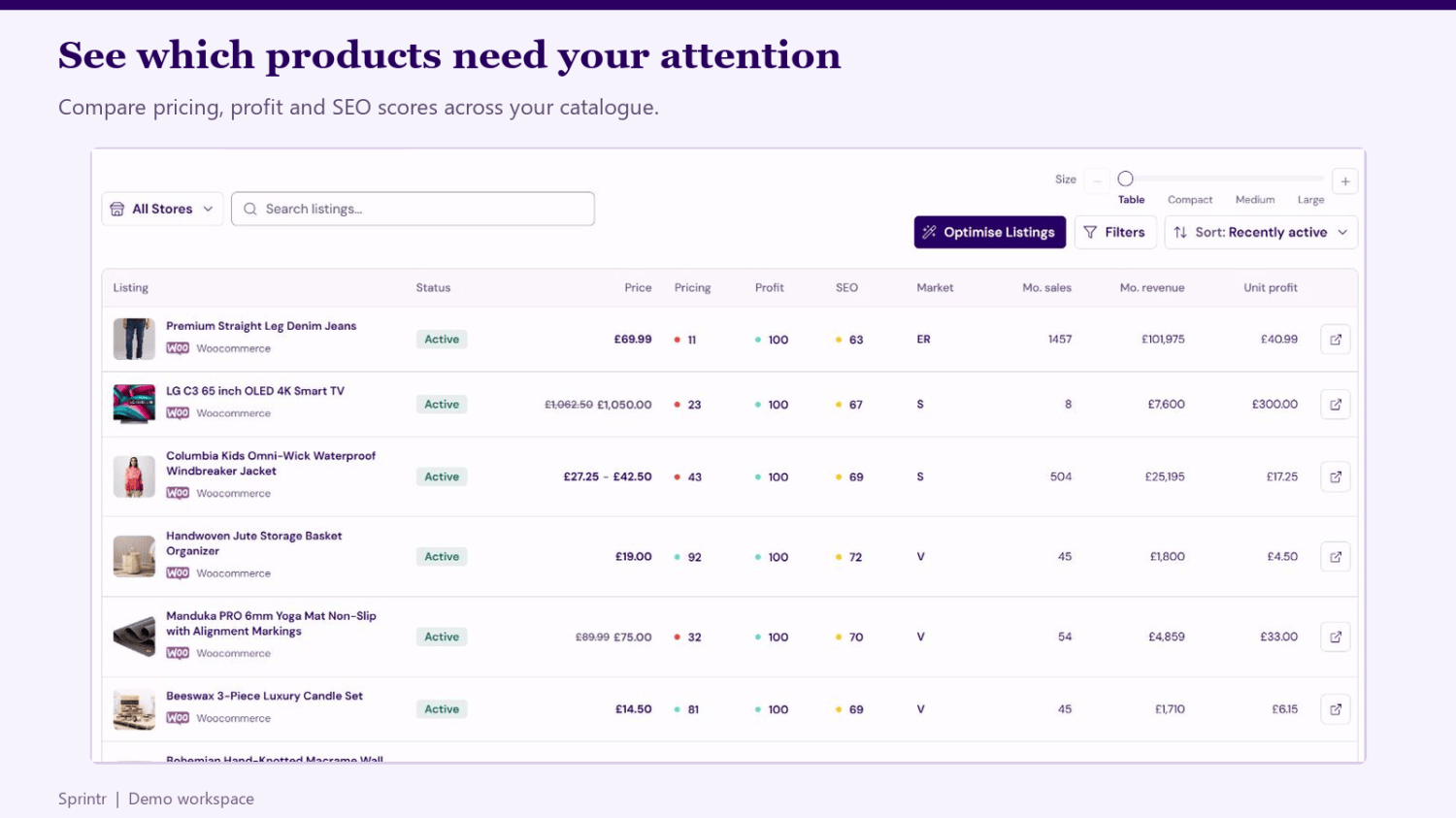
This is the tool I would consider after the store has enough SKUs that single-product plugins become the bottleneck. The strongest design choice is separation between generation and publishing: a workspace can be saved, compared with the current listing, reviewed, and then selectively approved. Sprintr also shows estimated media credit cost before a bulk run, which matters because AI image and video experiments can become expensive long before they become useful.
Its trade-off is architectural. Catalogue and brand assets are processed in an external service, and the extension requires a third-party subscription. Before connecting, I would document which fields sync in each direction, how deleted products are handled, which media fields publish directly, and what the export or disconnect process looks like.
Extendons AI Chatbot: product retrieval matters more than personality
A storefront assistant earns its space only when it can find the right product and admit when it cannot answer. Extendons can index products and help documents, run structured product searches by category, price and keyword, use hybrid retrieval, and allow logged-in customers to query their own order information. Persona and appearance controls are useful, but retrieval settings determine whether the chatbot is trustworthy.
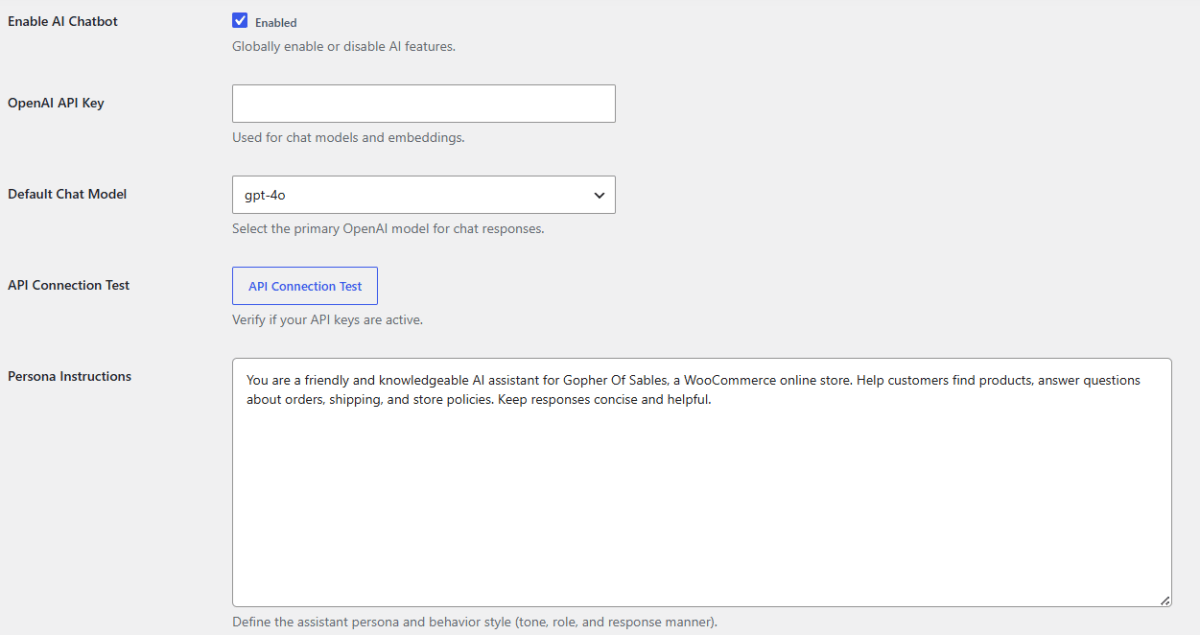
I would launch it on product discovery before order support. Create 30 test prompts with real constraints: budget, size, color, compatibility, shipping destination, out-of-stock products, and combinations the catalogue cannot satisfy. Score whether the answer links to an actually purchasable variation. A friendly answer that recommends the wrong size is worse than a search box.
Order lookup deserves a separate security test. Confirm that a logged-in customer can see only their own order, that logged-out visitors receive no order details, and that the bot never repeats private fields in analytics or conversation exports. The plugin can store conversations for admin review, so retention and staff access should be decided before launch.
Kestrel AI Assistant: narrow, simple and easy to understand
Kestrel adds AI controls to familiar WooCommerce fields. It can draft or expand product descriptions, summarize a long description into a short one, prepare review replies, and help write order notes. Prompts can use placeholders from the current WooCommerce record, and generated responses remain selectable before insertion.
That narrow scope is its appeal. A merchant who wants an occasional writing assistant may prefer it to a catalogue platform. It also uses the merchant’s OpenAI API key, so usage cost is visible in the provider account rather than hidden in an opaque credit system.
Its documentation still refers to GPT-3.5 Turbo and GPT-4, and the workflow is mainly one record at a time. I would confirm current model support before buying. I would also be careful with insertion behaviour: the documentation notes that selected output is appended to the existing product description rather than replacing it, which can produce duplicate copy if the editor does not clean up.
How I would test a WooCommerce AI plugin
- Clone ten awkward products.
Include variations, bundles, long attributes, missing data and a product with regulated claims. - Write a source-of-truth sheet.
Record approved dimensions, materials, price, compatibility and claims before generation. - Inspect outbound data.
Know whether product, customer, order and conversation data leave WordPress and which vendor receives it. - Test permissions.
A copywriter should not gain the ability to refund orders or expose customer records because an AI feature was enabled. - Force partial failures.
Interrupt a bulk run, remove an API key, exceed a rate limit, and confirm the queue can resume without duplicate changes. - Measure a real queue.
Compare reviewed products per hour and correction rate, not the speed of the first impressive demo.
My recommendation
Start with WooCommerce AI if the team wants store answers and carefully reviewed admin actions. Choose IntelliDesc when product descriptions, specifications and SEO are the bottleneck. Move to Sprintr when the team needs a catalogue-level review and scheduling workflow. Test Extendons AI Chatbot only when the product data and support documentation are already clean. Use Kestrel when a small store simply wants a writing helper in familiar fields.
Features checked November 3, 2026. Official sources: WooCommerce AI documentation; IntelliDesc listing; Sprintr marketplace page; Extendons documentation; Kestrel documentation.