FluentCRM and MailPoet both let you build lists and send campaigns without leaving WordPress. The real decision is whether you want a marketing CRM that connects deeply to site activity, or a newsletter product with delivery handled for you.
These are the two WordPress EDM plugins I would put on a serious shortlist. Both keep the writing and subscriber workflow in the WordPress dashboard, both can work with WooCommerce, and both have usable free starting points. They are not interchangeable.
FluentCRM is a self-hosted CRM and automation engine. It stores contacts and activity in the WordPress database, then relies on WordPress mail plus an external delivery provider such as Amazon SES, Mailgun, Postmark, SendGrid or Brevo. MailPoet is closer to a complete newsletter service inside WordPress. Its Starter, Business and Agency plans can use the MailPoet Sending Service, while the Creator plan is designed for teams bringing their own sender.
FluentCRM vs MailPoet at a glance
| Area | FluentCRM | MailPoet | Edge |
|---|---|---|---|
| Core product | CRM, segmentation and visual automation | Newsletter, forms, automations and sending service | Depends on use case |
| Sending | Configure a separate delivery provider through WordPress/SMTP | MailPoet Sending Service included on Starter, Business and Agency | MailPoet |
| Pricing basis | Annual license by number of sites; sending billed separately | Plan scales mainly with subscriber count | FluentCRM for large lists |
| Automation | Deep funnels, conditions, tags, webhooks and plugin events | Simpler visual automations with common email and WooCommerce triggers | FluentCRM |
| Email design | Practical builder plus HTML and reusable templates | Polished drag-and-drop editor with 70+ templates | MailPoet |
| WooCommerce | Purchase history, segmentation, cart recovery and broader funnels | Products in emails, first purchase, category/product purchase and cart reminders | FluentCRM for logic; MailPoet for ease |
| Contact profile | Detailed activity timeline and data from connected plugins | Subscriber, list, engagement and ecommerce data | FluentCRM |
| Operations | You own cron, queue, sender, bounce setup and database growth | MailPoet can manage delivery, bounces and list cleaning | MailPoet |
1. Setup: MailPoet gets to the first campaign faster
MailPoet is easier to explain to a small content team. Install the plugin, create or import a list, add a subscription form, select the MailPoet Sending Service, authenticate the domain if required, and build the campaign. The free Starter plan currently covers up to 500 subscribers and 5,000 emails per month, which is enough to test forms, templates, a welcome flow and actual delivery.
FluentCRM needs a more deliberate setup. The plugin is the campaign and automation brain, not the delivery network. Its documentation recommends a dedicated provider and FluentSMTP rather than sending from ordinary web hosting. That separation is technically sound and can be inexpensive, but the owner must create the delivery account, verify domains, configure SPF/DKIM, set a sensible send rate, test cron and connect bounce handling where supported.
MailPoet feels like
Buying a newsletter system whose controls happen to live in WordPress. Fewer moving parts, one support path and quicker onboarding.
FluentCRM feels like
Building a WordPress-owned marketing stack. More choices and lower marginal contact cost, but you are the integrator.
2. Email creation: MailPoet is friendlier for editorial teams
MailPoet’s editor is one of its strongest advantages. The official pricing page lists more than 70 customizable templates, mobile-friendly layouts, and blocks that can pull WordPress posts, pages and WooCommerce products directly into an email. For a publisher sending a weekly digest, the difference is practical: editors can assemble the newsletter without learning a separate SaaS interface or pasting product images and links manually.

FluentCRM’s composer is capable, and Pro includes a visual drag-and-drop builder, reusable templates and AI writing options. I prefer it when the email is part of a funnel and the copy is more important than decorative layout. It is less immediately elegant for a designer who wants to browse templates, insert several recent posts and send a polished magazine-style edition.
Neither editor protects the team from poor mobile design. I would still send tests to Gmail, Outlook and Apple Mail, check dark mode, inspect every button on a phone, and confirm that dynamic product prices and images remain correct after a product changes.
3. Contacts and segmentation: FluentCRM behaves like a real CRM
FluentCRM wins clearly when the subscriber is more than an email address. A contact profile can combine tags, lists, custom fields, email engagement, notes, purchase history, form submissions, support activity, course progress, appointments and other WordPress events when the relevant integrations are installed. That gives the marketer a useful question to ask: what did this person do on the site before and after receiving the email?
MailPoet handles the segmentation most newsletter teams actually use: lists, signup source, engagement, WordPress users, WooCommerce customers, purchase behavior and multi-condition segments on paid plans. It is enough for campaigns such as recent buyers, inactive subscribers or customers who bought from a category. It does not try to become the operating record for every membership, LMS and support interaction.
There is also a pricing detail worth noticing. MailPoet counts subscribed, inactive and unconfirmed addresses toward the plan limit, including eligible WordPress users and WooCommerce customers; unsubscribed and bounced contacts are excluded, and a person is not double-counted across multiple lists. FluentCRM licenses Pro by site count rather than contact count, although the delivery provider and hosting still cost more as volume grows.
4. Automation: FluentCRM is the stronger engine
FluentCRM’s visual funnels are built for branching journeys. A purchase, form submission, tag change, course event, membership event or incoming webhook can start a workflow. The automation can wait, evaluate conditions, apply tags, update fields, start or stop sequences, call webhooks, create coupons and send different messages based on the contact’s state.
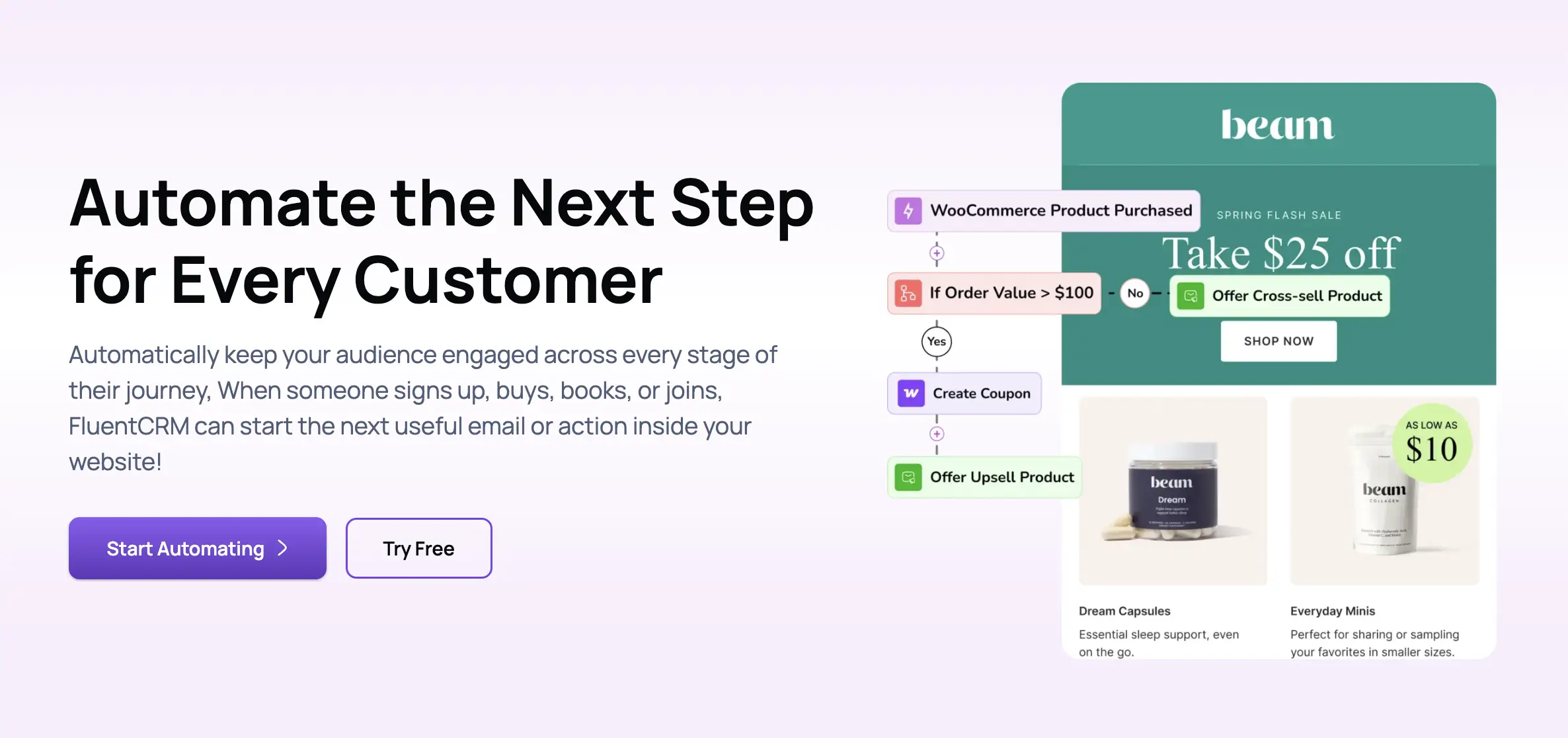
This is the better fit for a course business that needs different onboarding after enrollment, a membership site that reacts to level changes, or a WooCommerce store that wants post-purchase cross-sells based on category and order value. The trade-off is maintainability. A 40-step funnel with nested conditions can become software that nobody owns. I would name every automation, document its entry criteria, tag test contacts and record who receives an alert when a step fails.
MailPoet’s current Automations area covers the common journeys: welcome sequences, abandoned carts, first purchase, product or category purchases and other trigger/action combinations. This is enough for many stores, and the lower complexity is a virtue. If the desired journey can be drawn as a short straight line, MailPoet may be easier to keep correct.
5. WooCommerce: decide how much customer logic you need
Both plugins understand WooCommerce, but they approach it differently. MailPoet makes ecommerce email easy to build. Product blocks can be inserted into newsletters, and automations can target abandoned carts, first-time buyers, specific products and categories. Its paid reporting connects campaign engagement to orders, products purchased and revenue.
FluentCRM exposes more of the customer relationship. Purchase history appears on the contact, WooCommerce activity can start and branch automations, and marketers can combine commerce events with tags, forms, memberships, learning or support data. That matters when the journey does not end at checkout.
6. Deliverability and bounces: MailPoet owns more of the problem
MailPoet’s Sending Service bundles delivery, automatic bounce processing, list cleaning and support. Its documentation says domain signatures require no manual setup for that service, and sending confirmation is enforced. This removes several failure points for a business without an email specialist.
FluentCRM uses WordPress’s mail path and recommends FluentSMTP with a dedicated provider. That can produce excellent deliverability, but only if authentication, reputation, rate limits and bounce synchronization are correct. FluentCRM supports bounce handlers for a defined list of providers, not every SMTP service. A successful WordPress mail log only proves that the message was handed to the sender; it does not prove inbox placement.
For either plugin, I would verify SPF, DKIM and DMARC; warm a new sending domain; remove chronically inactive addresses; test reply handling; and monitor complaint, hard-bounce and unsubscribe rates. The editor is not the deliverability system.
7. Pricing: compare the complete stack, not the plugin line
FluentCRM Pro currently lists a regular price of $129 per year for one site, $249 for five sites and $499 for 50 sites, with first-year promotional prices shown separately. All Pro features are included, and the contact list does not change the plugin license. Email delivery is an additional cost, and larger databases may justify better hosting or database tuning.
MailPoet’s free Starter plan supports 500 subscribers and 5,000 emails per month. Business combines premium features and the MailPoet Sending Service; Creator provides the premium feature set while the owner supplies the sending method; Agency covers up to 50 websites. Paid pricing scales with subscriber count, so the correct comparison depends on the current list, expected growth and monthly sending frequency.
8. The self-hosting cost FluentCRM does not put on the invoice
FluentCRM’s control comes with operational ownership. Contacts, events and email logs expand the WordPress database. Campaign generation and automations depend on background processing and cron. Backups contain more customer data. Staging copies can accidentally include live subscribers, API credentials and scheduled tasks.
That is manageable, but the setup should include a real server cron, queue monitoring, database backups, retention rules for logs, a staging-send block, and enough resources for the list size. MailPoet also stores data in WordPress, but its hosted sending path removes more of the queue and bounce work from the server.
Run this test before choosing
- Import 200 realistic contacts.
Include unsubscribed, bounced, unconfirmed and duplicate addresses. - Build one weekly newsletter.
Use posts, products, mobile previews and reusable sections. - Create one revenue automation.
Test a welcome, abandoned-cart or post-purchase sequence from trigger to exit. - Force a delivery failure.
Confirm that bounces, retries and suppressed addresses are visible and actionable. - Test consent and preferences.
Verify double opt-in, unsubscribe, list preferences and data export/deletion. - Calculate the year-two cost.
Use the expected subscriber count, send volume, renewal price, delivery bill and hosting needs.
Final verdict
Choose MailPoet when the priority is publishing newsletters quickly, pulling WordPress posts and WooCommerce products into attractive templates, and having one service handle delivery, bounces and list cleaning. It is the safer recommendation for a publisher, local business or small store without someone who wants to manage email infrastructure.
Choose FluentCRM when email must react to detailed WordPress behavior, the team needs a richer contact record, or the list is large enough that per-subscriber pricing becomes uncomfortable. It is the better engine for WooCommerce, memberships, courses and multi-step lifecycle automation, provided the business is willing to own sending and system health.
Features and pricing checked November 7, 2026. Official sources: FluentCRM pricing; FluentCRM email delivery documentation; MailPoet plans; MailPoet limits; MailPoet sending methods.