The SEO plugin you install during a WordPress build becomes part of the site’s architecture. It decides which URLs search engines can see, how canonical tags are written, what Schema is published, and what happens when a page moves. That is a bigger job than turning a score from orange to green.

I have learned to treat SEO plugin selection like choosing a database layer, not choosing a writing assistant. The content analysis is visible every day, so it gets most of the attention. The expensive problems are quieter: a product archive accidentally indexed, an old URL redirected twice, duplicate Product Schema, attachment pages appearing in search, or a staging site’s noindex setting reaching production.
For a new build, my practical shortlist is Rank Math, Yoast SEO, SEOPress, All in One SEO, and The SEO Framework. All five can produce technically sound sites. The difference is how much control they expose, how they package paid features, and how much dashboard noise you are willing to live with.
Run one full SEO suite, not two. Yoast plus Rank Math does not give you twice the SEO. It gives you two systems competing to output titles, canonical tags, XML sitemaps, Open Graph data, and Schema. Use an import tool during migration, verify the output, then deactivate the old plugin.
Quick comparison
| Plugin | Best fit | Technical strengths | Current paid entry | Main trade-off |
|---|---|---|---|---|
| Rank Math | Stores and publishers wanting many controls in one plugin | Modular features, Schema, redirects, 404 monitor, analytics, WooCommerce | PRO €7.99/month, billed annually | Easy to enable more modules than the site needs |
| Yoast SEO | Teams wanting a mature, widely understood workflow | Schema graph, XML sitemaps, content guidance, redirect automation in Premium | $118.80/year for one site | One-site licensing becomes expensive across a portfolio |
| SEOPress | Agencies and builders who want control without constant upsells | Schema, redirects, 404 monitoring, WooCommerce, white label | $49/year for one site | Less hand-holding for a first-time site owner |
| AIOSEO | Business owners who like guided setup and reporting | TruSEO, Schema, sitemaps, WooCommerce, audits, higher-tier link tools | $49.50 first year for one site | Introductory pricing renews at the full listed rate |
| The SEO Framework | Lean sites with an experienced operator | Automated metadata, canonical rules, sitemaps, quiet interface | Strong free core; paid extensions optional | Fewer coaching and marketing features |
Rank Math: powerful when you keep the module list disciplined
Rank Math is the plugin I reach for when a site needs more than titles and sitemaps but I do not want to assemble five separate utilities. The free version already covers XML sitemaps, canonical tags, Schema, basic WooCommerce SEO, redirections, a 404 monitor, breadcrumb controls, role management, and Search Console integration. The modular dashboard lets you turn off features that another plugin or the theme already owns.
That breadth is useful on an e-commerce build. A store migration often needs regex redirects, product Schema, category controls, image metadata, breadcrumbs, and a clean way to noindex thin archives. Rank Math keeps those decisions in one place. Its October 2026 update also added WP-CLI sitemap generation, a practical improvement for large sites that should not rebuild a dynamic sitemap on every request.
The weakness is the same as the strength: there is always another switch. A beginner can finish the wizard with analytics, content scoring, instant indexing, image SEO, Schema templates, and several other modules active without understanding which ones are necessary. I normally start with the smallest configuration, inspect the page source, then enable features only when the site plan calls for them.
Yoast SEO: the easiest plugin to hand over to a content team
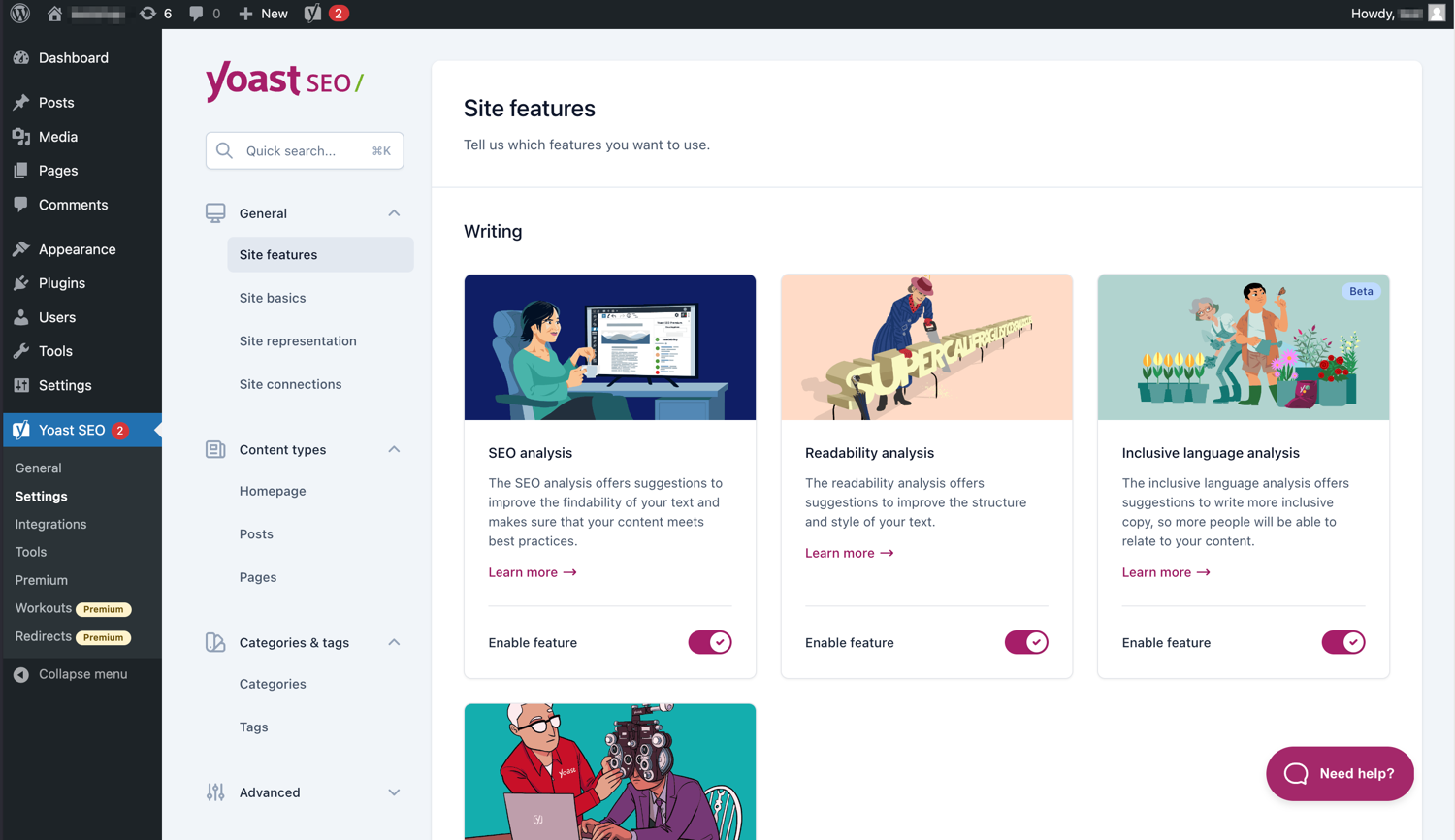
Yoast is still the least surprising choice when several people will edit the site. Writers recognize the traffic-light analysis, developers know its filters, hosting support teams have seen its common issues, and migration tools understand its metadata. Its real technical advantage is the connected Schema graph: instead of emitting unrelated blocks of structured data, Yoast tries to describe how the organization, website, author, article, and other entities relate.
The free plugin handles core metadata, canonical URLs, XML sitemaps, Schema, social previews, breadcrumbs, and content analysis. Premium currently includes automatic redirects, internal-linking suggestions, AI-assisted metadata, support, and the Local, News, and Video SEO plugins. That bundle is stronger than older comparisons suggest, but the $118.80 annual license covers one site, so agency economics remain different from SEOPress or Rank Math.
Yoast’s green lights are useful guardrails, not ranking instructions. I have seen perfectly good product pages made worse by stuffing a focus phrase into headings merely to satisfy a check. The plugin should catch omissions and inconsistencies; it should not rewrite the page’s voice. Used that way, Yoast is dependable and easy to document for a client.
SEOPress: clean ownership and unusually sensible licensing
SEOPress feels designed for people who build sites for other people. The interface is restrained, the free version is ad-free, and the Pro plan includes white labeling. More importantly, its paid features are not scattered across many small add-ons: automatic and manual Schema, redirects and 404 monitoring, WooCommerce SEO, local SEO, analytics, news and video sitemaps, and AI integrations sit in the same Pro package.
The current pricing is $49 per year for one site, $59 for five, and $149 for unlimited sites, with renewal at the same price while the subscription remains active. For an agency maintaining five client sites, that difference is meaningful. Metadata can be migrated from other major SEO plugins through the setup wizard, which reduces the friction of standardizing an existing portfolio.
SEOPress expects the operator to know what an archive, canonical, redirect, or Schema type means. That is a positive on a managed build and a mild disadvantage for a solo founder hoping the plugin will make every decision. I like it most when the site has a written SEO specification and the plugin is being configured to that specification.
All in One SEO: friendly onboarding with a plan-tier puzzle
AIOSEO is strongest when a business owner wants the plugin to guide the setup. Its wizard, TruSEO analysis, site audit, headline tools, XML and RSS sitemaps, Schema, breadcrumbs, and WooCommerce support create a clear path through the basics. Higher plans add local SEO, image SEO, link assistance, news and video sitemaps, 404 tracking, search statistics, rank tracking, and content-decay reports.
The interface is polished, and the reporting can keep an owner engaged with technical maintenance after launch. I am less fond of having to check a pricing matrix before promising a feature to a client. The advertised $49.50 Basic price is an introductory first-year offer; renewals use the full regular price. Some useful tools also sit on Plus, Pro, or Elite rather than Basic.
That does not make AIOSEO a bad value. It means the build estimate should use the renewal price and the exact tier required, not the largest discount on the landing page. When the client likes dashboards and guided recommendations, AIOSEO can be easier to adopt than a more technical product.
The SEO Framework: quiet automation for people who do not need coaching
The SEO Framework is the outlier in this list. It does not try to turn every post into a dashboard. It automatically produces sensible titles, descriptions, canonical URLs, Open Graph data, Schema, and sitemaps, then stays close to WordPress conventions. The free core is ad-free and does not push a subscription through admin notices.
I like it for brochure sites, documentation, and custom builds where the developer already understands indexation and wants fewer moving parts. Extensions add local SEO, article data, redirects, focus analysis, monitoring, and other specialist functions. The plugin’s restraint also makes it a good choice when a page builder or e-commerce plugin already handles part of the structured-data stack.
The trade-off is obvious: a content team that depends on real-time phrase scoring, internal-link prompts, AI copy tools, or large reporting dashboards may find it too quiet. The SEO Framework assumes that strategy lives outside the plugin. For an experienced operator, that can be refreshing. For a first website, it can feel like a lack of guidance.
How I configure an SEO plugin during a new build
- Map URL types before touching settings. List posts, pages, products, categories, tags, author archives, search results, filters, media pages, and custom post types. Decide which should be indexed and why.
- Choose one owner for each output. Confirm whether the SEO plugin, theme, WooCommerce, or a Schema plugin controls breadcrumbs, Product Schema, Open Graph images, and canonical tags. Duplicate output is usually an ownership problem.
- Configure staging protection separately. Password-protect staging and verify the production site’s visibility after deployment. Do not rely on a remembered checkbox.
- Test the rendered page, not the dashboard. Inspect source code, validate structured data, open the XML sitemap, follow redirects, and check canonical URLs on several templates.
- Record and export the configuration. Save the plugin settings, redirect map, title templates, and indexation rules with the project documentation. A migration should not depend on someone’s memory.
My recommendation
Choose Rank Math for the broadest technical toolkit in one plugin, especially on WooCommerce and content-heavy sites.
Choose Yoast SEO when a mixed-skill content team needs familiar workflows and dependable handover documentation.
Choose SEOPress for agency builds, white labeling, and straightforward multi-site economics.
Choose AIOSEO when guided setup and business-friendly reporting matter more than the lowest renewal cost.
Choose The SEO Framework for a lean, developer-managed site that does not need constant editorial coaching.
If I were building one new WooCommerce site today, I would start with Rank Math and disable every module the specification does not require. For a portfolio of client sites, I would look hardest at SEOPress. For a client team already trained on Yoast, I would not migrate merely to chase a longer feature list. A clean, well-documented configuration in a familiar plugin beats a powerful plugin nobody on the team understands.
The plugin is infrastructure, not a strategy. It can keep indexation consistent, describe entities, and protect migrations, but it cannot decide which customers matter or what deserves to rank. Pick the tool whose defaults you can explain, whose output you can test, and whose renewal price still makes sense after the launch discount disappears.
Features and pricing checked October 30, 2026: Rank Math pricing; Rank Math WordPress listing; Yoast SEO Premium; SEOPress pricing; AIOSEO pricing; The SEO Framework WordPress listing.