A membership plugin is not just a paywall. Once people start paying, it becomes the system that decides who gets access after an upgrade, a failed renewal, a refund, a cancellation, or a support-side exception. The best choice is the one whose billing and permission model matches the business you are actually building.

I have seen membership projects start with a deceptively small requirement: lock three pages and charge $19 per month. Six months later, the owner wants annual billing, a free trial, team accounts, course progress, member-only discounts, failed-payment emails, gift access, tax invoices, and a way for support staff to grant seven extra days without touching Stripe. That is when the original plugin decision becomes expensive.
My current shortlist is MemberPress, Paid Memberships Pro, WooCommerce Memberships, MemberMouse, and SureMembers. They can all restrict content, but they are built around very different assumptions.
Create a real test subscription, let a payment fail, retry it, issue a partial and full refund, cancel at period end, upgrade the member, and then export the record. A membership system is defined by these state changes, not by how quickly its first pricing table can be published.
Quick comparison
| Plugin | Best fit | Payments | Current paid entry | Main trade-off |
|---|---|---|---|---|
| MemberPress | Creators combining memberships, courses, coaching, and community | Built-in subscription checkout and multiple gateways | Launch $199.50/year introductory | Many advanced features sit on higher plans |
| Paid Memberships Pro | Custom membership sites and budget-conscious launches | Gateways included in the open-source core | Free core; Standard $49/month | Configuration and add-on choices require more planning |
| WooCommerce Memberships | Stores selling member access, products, and discounts together | Uses WooCommerce products; recurring billing needs Subscriptions | Paid extension, with Subscriptions often an added cost | The stack becomes heavy if the site is not already a store |
| MemberMouse | Mature subscription businesses focused on retention and revenue | Native checkout, billing controls, upsells, and dunning tools | Basic $149.50/year introductory | More operational complexity than a simple content club needs |
| SureMembers | Lightweight access control with SureCart or WooCommerce | Payments live in a separate commerce plugin | Starter $69/year introductory | It is a permission layer, not a complete billing platform |
MemberPress: the shortest route from expertise to a paid product
MemberPress makes the most sense when the membership itself is the business. Its access rules can protect posts, pages, categories, custom post types, downloads, courses, and other resources. The same product now reaches into course delivery, coaching, community spaces, member directories, gifting, coupons, checkout pages, and corporate accounts. A creator can build a surprisingly complete operation without stitching together a separate LMS and community plugin.
The Launch plan currently shows an introductory price of $199.50 per year, Growth $349.50, and Scale $499.50. The feature differences matter. Community tools, more advanced course capability, corporate accounts, automation, API access, and some revenue features are tied to higher tiers. I would map the actual launch requirements against the plan table instead of assuming the cheapest license can be upgraded later without changing the budget.
What feels good in use is the coherence: membership levels, rules, checkout, account pages, and learning products share the same mental model. The downside is that a coherent suite can also pull the site toward its way of working. If the business already has a mature WooCommerce catalog or a separate LMS, MemberPress may duplicate systems that are already doing the job.
Paid Memberships Pro: more capable than the word “free” suggests
Paid Memberships Pro is the option I trust when the project needs flexibility and the team is comfortable reading documentation. Its open-source core includes unlimited membership levels and members, content restriction, recurring subscriptions, discount codes, reports, member management, and supported payment gateways. The company now presents two operating models: run it yourself with the free core or Standard support plan, or use the managed PMPro Max environment.
That distinction is practical. The free plugin is not a crippled demo, but “free software” does not mean a free membership business. Hosting, transactional email, backups, gateway fees, tax handling, and development time still exist. Standard is currently $49 per month for premium add-ons and support on one site. PMPro Max is listed at $99 per month or $999 per year and adds managed infrastructure and implementation credits.
PMPro rewards a site with a written requirements document. Its hooks, add-ons, templates, and developer-friendly model can solve unusual membership structures, but the owner needs to know which pieces should remain standard. I would choose it over MemberPress when custom workflows and long-term code ownership matter more than the fastest no-code launch.
WooCommerce Memberships: choose it when membership is part of commerce
WooCommerce Memberships is not trying to replace the store. It turns WooCommerce products and customer accounts into access rules. A product purchase can grant a membership, plans can drip content, and members can receive product discounts or exclusive purchasing rights. This is a strong model for wine clubs, wholesale programs, paid loyalty tiers, product bundles, and stores where physical or digital purchases should unlock content.
The important catch is recurring billing. Memberships can create fixed-length or unlimited access, but recurring memberships require WooCommerce Subscriptions. That means two premium extensions, two sets of settings, and the operational weight of WooCommerce. On a store that already depends on WooCommerce, this is sensible reuse. On a content-only publication, it is usually more machinery than the business needs.
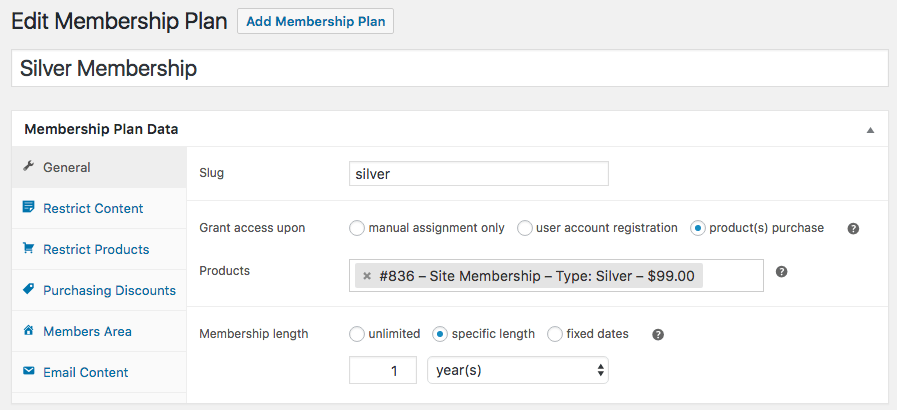
I particularly like that access can follow the product lifecycle. A paid order grants the membership, while expired, paused, or cancelled membership states remove protected access. But I would test every custom order status and refund path. Stores often add fulfillment or preorder plugins that introduce statuses the membership rules were never designed to interpret.
MemberMouse: built for the awkward middle of the customer lifecycle
MemberMouse becomes interesting after the first sale. It supports one-click purchases, upsells and downsells, trials, payment plans, prorated upgrades, gifting, overdue-payment recovery, reporting, employee permissions, and targeted offers. Its product-and-access model separates what the customer buys from the membership level or bundle they receive, which enables several prices or billing schedules to grant the same access.
That separation is powerful once the business is testing annual versus monthly offers, lifetime upgrades, bundles, or retention discounts. It is also more abstract than a basic “membership level costs $29” setup. Support staff need to understand products, membership levels, bundles, and subscription states or they can create access that looks correct on one screen but bills differently on another.
Basic currently starts at an introductory $149.50 per year, Plus at $249.50, and Pro at $349.50; annual renewals are at full price. PayPal and Braintree begin on Plus, while Pro adds Authorize.Net, billing-date controls, deeper analytics, and more advanced operations. This is not my pick for a small private newsletter, but it deserves a serious look when retention mechanics and revenue reporting are central.
SureMembers: clean permissions when checkout belongs elsewhere
SureMembers focuses on access groups and content protection. It can restrict posts, pages, courses, custom post types, blocks, and other resources, then grant or revoke access through SureCart, WooCommerce, SureForms, or automation. The membership data stays in WordPress, and the plugin now includes analytics, team accounts on Premium, member listings, drip controls, and integrations with popular LMS products.
This split is either elegant or inconvenient. If SureCart already owns subscriptions and checkout, SureMembers is a clean permission layer. If the owner expects one plugin to collect payments, manage invoices, retry failed charges, and control access, the two-product architecture needs explaining. The current Starter offer is $69 per year for one site, with a regular renewal price of $99; larger licenses cover 10 or 100 sites.
I would use SureMembers for a modern block-based site that values a simple admin experience and already has a commerce decision. I would not choose it before choosing the payment system. Access revocation is only as reliable as the event arriving from SureCart, WooCommerce, or the connected automation.
Six checks before you commit to a membership plugin
- Model every membership state. Write down what happens when a payment succeeds, fails, retries, refunds, disputes, expires, pauses, upgrades, downgrades, or cancels at period end.
- Confirm who owns the subscription. Stripe, PayPal, WooCommerce, or the plugin may be the source of truth. Know where staff should edit billing and which changes sync back.
- Test protection beyond the page. Hiding a page does not automatically secure a direct PDF, video, or media URL. Use protected storage or signed delivery for valuable files.
- Check email and cron reliability. Welcome messages, renewal notices, dripping, expirations, and payment retries depend on transactional email and scheduled jobs that must actually run.
- Plan the support workflow. Give staff safe tools to grant temporary access, resend receipts, change a plan, and view payment history without handing them full administrator access.
- Perform an exit test. Export users, levels, subscription IDs, access dates, and transaction history. A CSV of email addresses alone is not a migration plan.
My recommendation
Choose MemberPress when a creator wants memberships, courses, coaching, and community to feel like one product.
Choose Paid Memberships Pro when flexibility, open-source ownership, and custom development matter most.
Choose WooCommerce Memberships when products, member discounts, and access belong inside an existing WooCommerce store.
Choose MemberMouse for an established subscription business that needs dunning, upsells, retention offers, and deeper revenue operations.
Choose SureMembers for a clean access layer when SureCart, WooCommerce, or another system already owns checkout.
For a first paid content site, MemberPress is the easiest complete recommendation. For a technically managed project, Paid Memberships Pro gives me more room and a credible free starting point. If the business already sells through WooCommerce, I would resist adding a second customer and payment system unless the membership requirements clearly exceed what WooCommerce Memberships can support.
The least exciting part of a membership site is also the part members remember: access changes correctly when money changes state. Choose the plugin whose billing events, permissions, staff tools, and exports you can test and explain. The pricing page matters; the failed-payment workflow matters more.
Features and pricing checked November 2, 2026: MemberPress pricing; Paid Memberships Pro plans; WooCommerce Memberships documentation; MemberMouse plans; SureMembers pricing; SureMembers WordPress listing.